> ## Documentation Index
> Fetch the complete documentation index at: https://docs.whitecircle.com/llms.txt
> Use this file to discover all available pages before exploring further.
# Sessions Webhook
> Incoming event notifications for your configured webhook URL.
The Webhooks API is a streamlined way to build apps that respond to activities in White Circle. When you use the Webhooks API, White Circle calls you.
## Subscribing to events
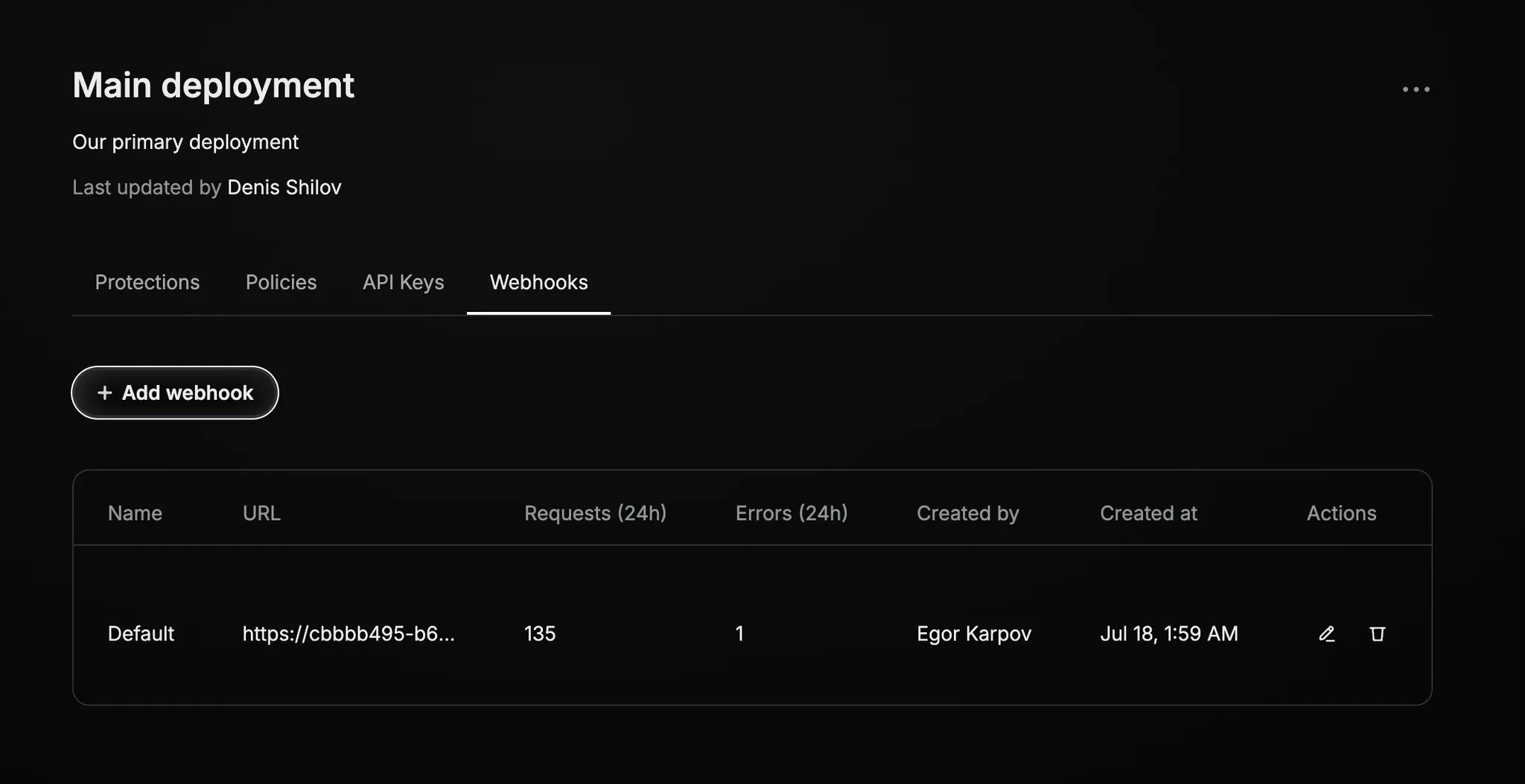
To begin working with the Webhooks API, you’ll need to create a Deployment if you haven’t already. While managing your deployment, find the Webhooks page there.
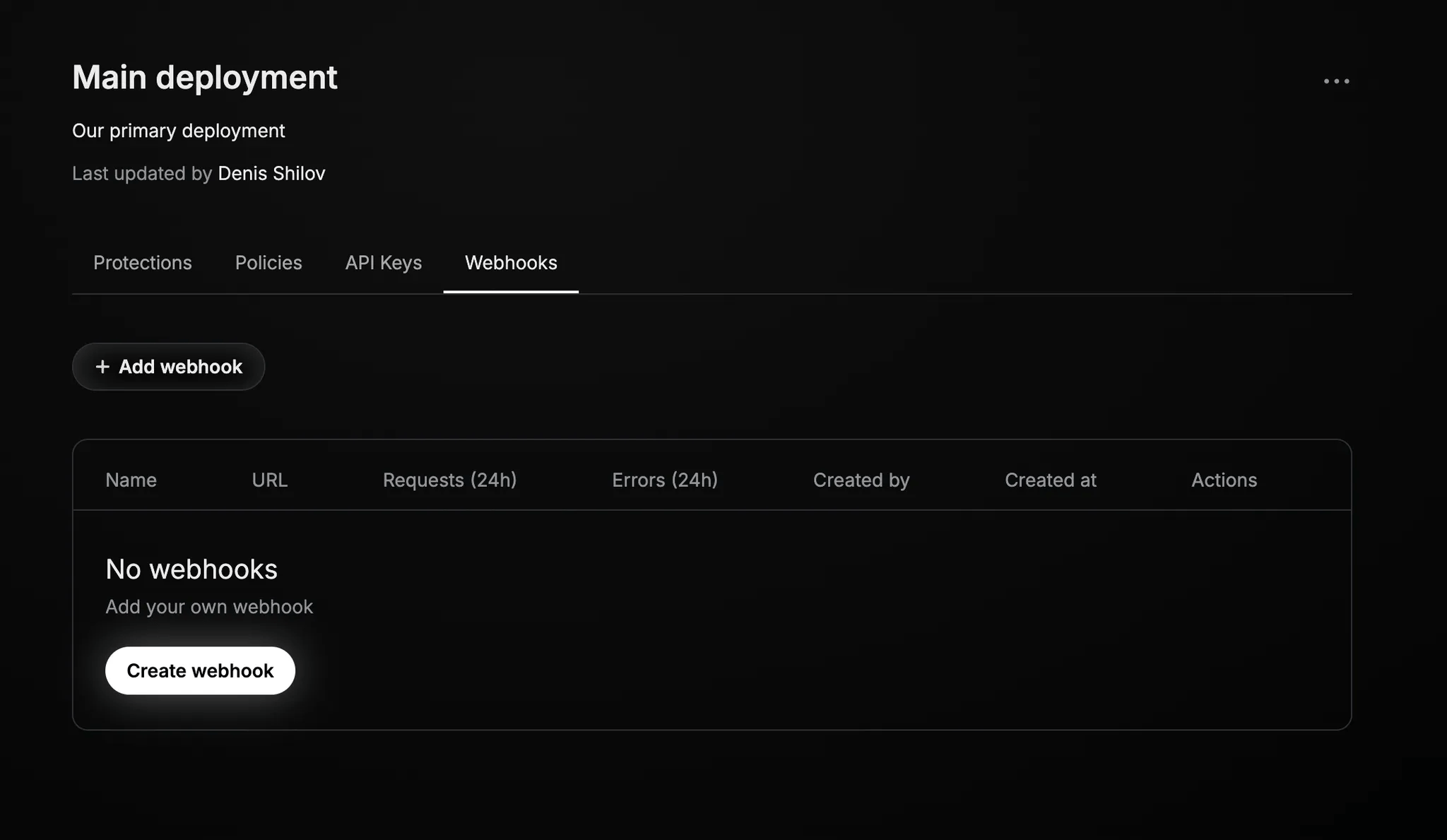 You’ll see the signing secret when creating a webhook. You will need it later to verify the authenticity of the
events.
## Available event types
| Event Type | When does it happen? |
| --------------------------- | ---------------------------------------------------------------------------------------------------------------------------------------------------------------------------- |
| `review_manual.in_progress` | Someone from your team starts a manual review of the session and changes a model-generated verdict (for example, marking something as “false positive” or “false negative”). |
| `review_manual.completed` | Reviewer finished the manual check and submitted the changes. |
| `review_auto.completed` | Our larger model has finished automatically checking the session. |
## Receiving events
Your webhook URL will receive a request for each event type you select. One request = one event.
Only the changed verdicts are included in each event. For example, if five policies are enabled in your deployment
and our larger model (or your colleague reviewing the session) changes the verdict on two of them, we will send you
only the revised policies.
## Error handling
Return an HTTP 200 OK for every event your webhook successfully receives.
### Failure conditions
We consider any of these scenarios a single failure condition:
* We're unable to negotiate or validate your server's SSL certificate.
* We wait longer than 3 seconds to receive a valid response from your server.
* We receive any other response than an HTTP 200-series response.
### Retries
We'll retry a failed request up to 3 times in a gradually increasing timetable:
1. The first retry is sent almost immediately.
2. The second retry will be attempted after 2 seconds.
3. The third and final retry will be sent after 4 seconds.
You can check the number of total requests and retries per last 24 hours on the deployment page on the platform.
You’ll see the signing secret when creating a webhook. You will need it later to verify the authenticity of the
events.
## Available event types
| Event Type | When does it happen? |
| --------------------------- | ---------------------------------------------------------------------------------------------------------------------------------------------------------------------------- |
| `review_manual.in_progress` | Someone from your team starts a manual review of the session and changes a model-generated verdict (for example, marking something as “false positive” or “false negative”). |
| `review_manual.completed` | Reviewer finished the manual check and submitted the changes. |
| `review_auto.completed` | Our larger model has finished automatically checking the session. |
## Receiving events
Your webhook URL will receive a request for each event type you select. One request = one event.
Only the changed verdicts are included in each event. For example, if five policies are enabled in your deployment
and our larger model (or your colleague reviewing the session) changes the verdict on two of them, we will send you
only the revised policies.
## Error handling
Return an HTTP 200 OK for every event your webhook successfully receives.
### Failure conditions
We consider any of these scenarios a single failure condition:
* We're unable to negotiate or validate your server's SSL certificate.
* We wait longer than 3 seconds to receive a valid response from your server.
* We receive any other response than an HTTP 200-series response.
### Retries
We'll retry a failed request up to 3 times in a gradually increasing timetable:
1. The first retry is sent almost immediately.
2. The second retry will be attempted after 2 seconds.
3. The third and final retry will be sent after 4 seconds.
You can check the number of total requests and retries per last 24 hours on the deployment page on the platform.
 ## Verifying requests from White Circle
Using signed secrets, you can verify that requests from White Circle are authentic.
### Understanding signed secrets
You can verify requests from White Circle by verifying signatures using your signing secret.
On each HTTP request that White Circle sends, White Circle adds an `X-Whitecircle-Signature` HTTP header (or `x-whitecircle-signature` — header names are meant to be case-insensitive, so the letter case should not be assumed).
The signature is created by hashing the request body with the SHA-256 function, and combining it with an [HMAC](https://en.wikipedia.org/wiki/HMAC) signing secret. The resulting signature is unique to each request and doesn't contain any sensitive information.
Request signing follows this pattern:
* Your app receives a request from White Circle.
* Your app computes a signature based on the request.
* You make sure the signature you've computed matches the signature on the request.
Let's go over the recipe for this signature.
### Validating a request
```python theme={null}
>>> whitecircle_signing_secret = 'MY_WHITECIRCLE_SIGNING_SECRET'
>>> request_body = request.text
'{"event_type":"review_auto.completed","violation":true,"internal_id":"2e9f6747-045a-4713-9a60-8c166203fce7","violations":{"4fa864e4-9af1-43b6-9fbb-33627980041f":{"violation":true,"violation_source":["text"]},"35822a7e-dc4d-4b9a-a27b-c088e8c73f1c":{"violation":false,"violation_source":["text"]},"069167bb-bda5-4b2a-b012-e3ca78944951":{"violation":false,"violation_source":["text"]}}}'
```
Use the raw request body, without headers, before it has been deserialized from JSON or other forms.
For example, in Python's Flask, use `request.get_data()` before accessing any other methods on the request in order to get the raw request payload, without performing JSON deserialization.
The signature depends on the timestamp to protect against replay attacks. While you're extracting the timestamp, check to make sure that the request occurred recently. In this example, we verify that the timestamp does not differ from local time by more than five minutes.
```python theme={null}
>>> import time
>>> timestamp = request.headers['X-Whitecircle-Request-Timestamp']
'1752847035'
>>> time.time() - int(timestamp) < 5 * 60
True
```
```python theme={null}
>>> sig_basestring = 'v0:' + timestamp + ':' + request_body
'v0:1752847035:{"event_type":"review_auto.completed","violation":true,"internal_id":"2e9f6747-045a-4713-9a60-8c166203fce7","violations":{"4fa864e4-9af1-43b6-9fbb-33627980041f":{"violation":true,"violation_source":["text"]},"35822a7e-dc4d-4b9a-a27b-c088e8c73f1c":{"violation":false,"violation_source":["text"]},"069167bb-bda5-4b2a-b012-e3ca78944951":{"violation":false,"violation_source":["text"]}}}'
```
```python theme={null}
>>> import hmac
>>> import hashlib
>>> my_signature = 'v0=' + hmac.new(whitecircle_signing_secret.encode(), sig_basestring.encode(), hashlib.sha256).hexdigest()
'v0=37a8f9210398d5f370b2a10a4413ca16075d373e0c418d14c83ad71354912fbd'
```
```python theme={null}
>>> whitecircle_signature = request.headers['X-Whitecircle-Signature']
>>> hmac.compare_digest(my_signature, whitecircle_signature)
True
```
That's it! You may now proceed with processing the update.
```json Webhook request body theme={null}
{
"event_type": "review_auto.completed",
"violation": true,
"internal_id": "80782a99-04b0-426b-8c59-f6a68ec08a26",
"external_id": "9dad26de-d17b-47e9-8d6a-2a096cdff151",
"violations": {
"f714c7a0-0779-4838-894f-d05e9e6cd61f": {
"violation": false,
"violation_source": ["text"]
},
"5dd86eea-f13a-4a97-aa1e-ca5f76b63255": {
"violation": true,
"violation_source": ["text"]
}
}
}
```
```python Webhook verification theme={null}
import time, hmac, hashlib
## Step 1: Get secret and raw body
whitecircle_signing_secret = 'MY_WHITECIRCLE_SIGNING_SECRET'
request_body = request.text
# '{"event_type":"review_auto.completed","violation":true,"internal_id":"2e9f6747-045a-4713-9a60-8c166203fce7","violations":{"4fa864e4-9af1-43b6-9fbb-33627980041f":{"violation":true,"violation_source":["text"]},"35822a7e-dc4d-4b9a-a27b-c088e8c73f1c":{"violation":false,"violation_source":["text"]},"069167bb-bda5-4b2a-b012-e3ca78944951":{"violation":false,"violation_source":["text"]}}}'*/
## Step 2: Validate timestamp freshness
timestamp = request.headers['X-Whitecircle-Request-Timestamp'] # '1752847035'
time.time() - int(timestamp) < 5 * 60 # if True...
## Step 3: Build signature base string
sig_basestring = 'v0:' + timestamp + ':' + request_body
# 'v0:1752847035:{"event_type":"review_auto.completed","violation":true,"internal_id":"2e9f6747-045a-4713-9a60-8c166203fce7","violations":{"4fa864e4-9af1-43b6-9fbb-33627980041f":{"violation":true,"violation_source":["text"]},"35822a7e-dc4d-4b9a-a27b-c088e8c73f1c":{"violation":false,"violation_source":["text"]},"069167bb-bda5-4b2a-b012-e3ca78944951":{"violation":false,"violation_source":["text"]}}}'
## Step 4: Compute HMAC-SHA256 signature
my_signature = 'v0=' + hmac.new(whitecircle_signing_secret.encode(), sig_basestring.encode(), hashlib.sha256).hexdigest()
# 'v0=37a8f9210398d5f370b2a10a4413ca16075d373e0c418d14c83ad71354912fbd'
## Step 5: Compare signatures
whitecircle_signature = request.headers['X-Whitecircle-Signature']
hmac.compare_digest(my_signature, whitecircle_signature) # if True...
## Step 6: Process the event
request_body['event_type']...
## Step 7: Return 200 OK
return '200 OK'
```
## OpenAPI
````yaml WEBHOOK /webhook2
openapi: 3.1.0
info:
title: WhiteCircle Webhooks
description: Webhook events delivered to your endpoint
version: '2025-06-15'
servers: []
security: []
paths: {}
````
## Verifying requests from White Circle
Using signed secrets, you can verify that requests from White Circle are authentic.
### Understanding signed secrets
You can verify requests from White Circle by verifying signatures using your signing secret.
On each HTTP request that White Circle sends, White Circle adds an `X-Whitecircle-Signature` HTTP header (or `x-whitecircle-signature` — header names are meant to be case-insensitive, so the letter case should not be assumed).
The signature is created by hashing the request body with the SHA-256 function, and combining it with an [HMAC](https://en.wikipedia.org/wiki/HMAC) signing secret. The resulting signature is unique to each request and doesn't contain any sensitive information.
Request signing follows this pattern:
* Your app receives a request from White Circle.
* Your app computes a signature based on the request.
* You make sure the signature you've computed matches the signature on the request.
Let's go over the recipe for this signature.
### Validating a request
```python theme={null}
>>> whitecircle_signing_secret = 'MY_WHITECIRCLE_SIGNING_SECRET'
>>> request_body = request.text
'{"event_type":"review_auto.completed","violation":true,"internal_id":"2e9f6747-045a-4713-9a60-8c166203fce7","violations":{"4fa864e4-9af1-43b6-9fbb-33627980041f":{"violation":true,"violation_source":["text"]},"35822a7e-dc4d-4b9a-a27b-c088e8c73f1c":{"violation":false,"violation_source":["text"]},"069167bb-bda5-4b2a-b012-e3ca78944951":{"violation":false,"violation_source":["text"]}}}'
```
Use the raw request body, without headers, before it has been deserialized from JSON or other forms.
For example, in Python's Flask, use `request.get_data()` before accessing any other methods on the request in order to get the raw request payload, without performing JSON deserialization.
The signature depends on the timestamp to protect against replay attacks. While you're extracting the timestamp, check to make sure that the request occurred recently. In this example, we verify that the timestamp does not differ from local time by more than five minutes.
```python theme={null}
>>> import time
>>> timestamp = request.headers['X-Whitecircle-Request-Timestamp']
'1752847035'
>>> time.time() - int(timestamp) < 5 * 60
True
```
```python theme={null}
>>> sig_basestring = 'v0:' + timestamp + ':' + request_body
'v0:1752847035:{"event_type":"review_auto.completed","violation":true,"internal_id":"2e9f6747-045a-4713-9a60-8c166203fce7","violations":{"4fa864e4-9af1-43b6-9fbb-33627980041f":{"violation":true,"violation_source":["text"]},"35822a7e-dc4d-4b9a-a27b-c088e8c73f1c":{"violation":false,"violation_source":["text"]},"069167bb-bda5-4b2a-b012-e3ca78944951":{"violation":false,"violation_source":["text"]}}}'
```
```python theme={null}
>>> import hmac
>>> import hashlib
>>> my_signature = 'v0=' + hmac.new(whitecircle_signing_secret.encode(), sig_basestring.encode(), hashlib.sha256).hexdigest()
'v0=37a8f9210398d5f370b2a10a4413ca16075d373e0c418d14c83ad71354912fbd'
```
```python theme={null}
>>> whitecircle_signature = request.headers['X-Whitecircle-Signature']
>>> hmac.compare_digest(my_signature, whitecircle_signature)
True
```
That's it! You may now proceed with processing the update.
```json Webhook request body theme={null}
{
"event_type": "review_auto.completed",
"violation": true,
"internal_id": "80782a99-04b0-426b-8c59-f6a68ec08a26",
"external_id": "9dad26de-d17b-47e9-8d6a-2a096cdff151",
"violations": {
"f714c7a0-0779-4838-894f-d05e9e6cd61f": {
"violation": false,
"violation_source": ["text"]
},
"5dd86eea-f13a-4a97-aa1e-ca5f76b63255": {
"violation": true,
"violation_source": ["text"]
}
}
}
```
```python Webhook verification theme={null}
import time, hmac, hashlib
## Step 1: Get secret and raw body
whitecircle_signing_secret = 'MY_WHITECIRCLE_SIGNING_SECRET'
request_body = request.text
# '{"event_type":"review_auto.completed","violation":true,"internal_id":"2e9f6747-045a-4713-9a60-8c166203fce7","violations":{"4fa864e4-9af1-43b6-9fbb-33627980041f":{"violation":true,"violation_source":["text"]},"35822a7e-dc4d-4b9a-a27b-c088e8c73f1c":{"violation":false,"violation_source":["text"]},"069167bb-bda5-4b2a-b012-e3ca78944951":{"violation":false,"violation_source":["text"]}}}'*/
## Step 2: Validate timestamp freshness
timestamp = request.headers['X-Whitecircle-Request-Timestamp'] # '1752847035'
time.time() - int(timestamp) < 5 * 60 # if True...
## Step 3: Build signature base string
sig_basestring = 'v0:' + timestamp + ':' + request_body
# 'v0:1752847035:{"event_type":"review_auto.completed","violation":true,"internal_id":"2e9f6747-045a-4713-9a60-8c166203fce7","violations":{"4fa864e4-9af1-43b6-9fbb-33627980041f":{"violation":true,"violation_source":["text"]},"35822a7e-dc4d-4b9a-a27b-c088e8c73f1c":{"violation":false,"violation_source":["text"]},"069167bb-bda5-4b2a-b012-e3ca78944951":{"violation":false,"violation_source":["text"]}}}'
## Step 4: Compute HMAC-SHA256 signature
my_signature = 'v0=' + hmac.new(whitecircle_signing_secret.encode(), sig_basestring.encode(), hashlib.sha256).hexdigest()
# 'v0=37a8f9210398d5f370b2a10a4413ca16075d373e0c418d14c83ad71354912fbd'
## Step 5: Compare signatures
whitecircle_signature = request.headers['X-Whitecircle-Signature']
hmac.compare_digest(my_signature, whitecircle_signature) # if True...
## Step 6: Process the event
request_body['event_type']...
## Step 7: Return 200 OK
return '200 OK'
```
## OpenAPI
````yaml WEBHOOK /webhook2
openapi: 3.1.0
info:
title: WhiteCircle Webhooks
description: Webhook events delivered to your endpoint
version: '2025-06-15'
servers: []
security: []
paths: {}
````